Typing Test Online – Check Hindi & English Typing Speed and Accuracy
Typing is an essential core skill required across a wide spectrum of modern professions, including government recruitment posts, competitive examinations, data entry operations, corporate office tasks, and computer-based tests. Whether you are aiming for a clerical role or a administrative position, possessing strong keyboard familiarity, high speed, and flawless accuracy can give you a decisive edge. Regular typing practice helps you become more familiar with the layout of the keyboard, minimizes common input errors, and significantly boosts your overall productivity.
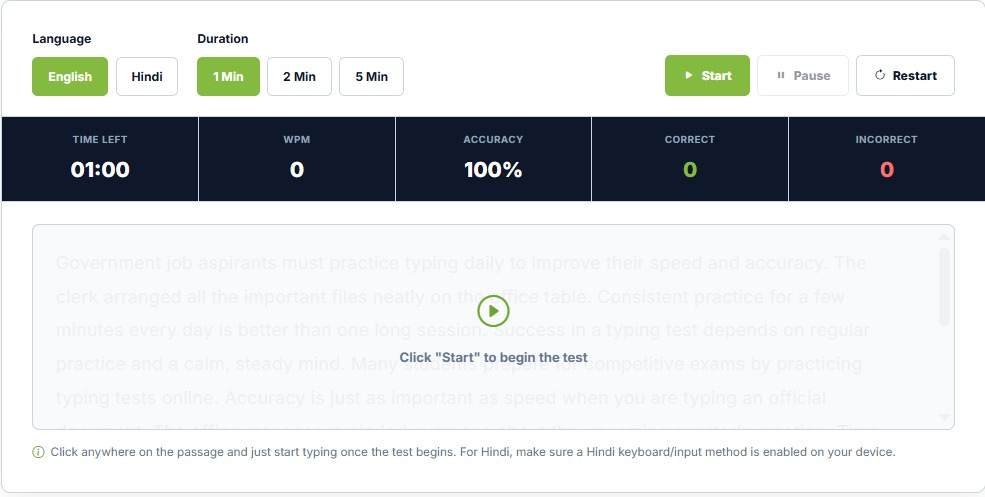
The JobBodh Typing Test Online is a specialized utility designed to help aspirants practice typing in both Hindi and English. By selecting your preferred language, you can type the provided passage, measure your performance in real-time, and systematically track your improvement over time.
Start Typing Test:Click Here
What is an Online Typing Test?
An Online Typing Test is an interactive web-based tool designed to evaluate and measure your typing speed and accuracy while you type a given passage or text snippet within a specific timeframe.
The test provides a clear objective assessment of how quickly and accurately your fingers move across the keys. Regular, disciplined practice on such a platform helps build muscle memory, reduces the habit of constantly looking down at the keyboard, and increases your comfort level during high-pressure computer-based examinations.
Bilingual Practice: Hindi and English Typing Tests
To cater to diverse competitive exam requirements across different states and central boards, the JobBodh Typing Test platform supports dual languages:
- English Typing Test: Ideal for general clerical posts, SSC examinations, banking exams, and standard corporate data entry tasks.
- Hindi Typing Test: Specifically tailored for candidates preparing for state-level government examinations, secretarial roles, and departments that mandate proficiency in Hindi typing layouts (such as Remington or InScript).
How to Take a Typing Test Online?
Using the JobBodh Typing Test is straightforward, user-friendly, and completely free. Follow these simple steps to begin your assessment:
- Access the Tool: Open the dedicated Click Here page in your web browser.
- Select Your Language: Choose between Hindi or English depending on your target exam requirements.
- Choose Test Duration: Select from the available test time limits or practice options to suit your current training schedule.
- Read the Passage: Review the displayed passage carefully before beginning.
- Start Typing: Place your fingers on the home row and begin typing in the designated input area.
- Maintain Balance: Focus on maintaining a steady rhythm that balances both speed and accuracy.
- Complete Within Time: Finish the test before the selected timer runs out.
- Analyze Your Result: Review your final performance report immediately upon completion to identify weak areas.
What Metrics Does a Typing Test Measure?
A professional typing test evaluates your input performance using two primary metrics:
1. Typing Speed (WPM)
Typing speed indicates how quickly you can input text, commonly measured in Words Per Minute (WPM). For instance, if you successfully type 35 words within a single minute, your speed is recorded as approximately 35 WPM, though exact calculations may factor in character counts and standard word lengths (usually calculated as 5 characters per word).
2. Typing Accuracy (%)
Accuracy measures how correctly you transcribed the given passage without making spelling mistakes, missed strokes, or extra characters. Maintaining a high accuracy percentage (typically 90% to 95% above) is often mandatory to qualify in official government typing evaluations, as excessive errors can lead to heavy negative marking or outright disqualification.
Why Should You Practice Typing Online?
Consistent online typing practice yields multiple cognitive and practical benefits for job seekers and students:
- Improves Speed: Trains your hands to move fluidly across the keyboard, boosting your overall WPM count.
- Enhances Accuracy: Trains your brain to spot errors instantly and reduces accidental keystrokes.
- Identifies Mistakes: Highlights recurrent typographical errors (such as swapping adjacent letters or missing punctuation).
- Builds Keyboard Familiarity: Develops strong muscle memory so your fingers find keys instinctively without visual confirmation.
- Supports Multilingual Preparation: Allows seamless practice in both Hindi and English layouts.
- Prepares for Exams: Recreates the testing environment of computer-based recruitment drives.
- Tracks Progress: Enables you to monitor your performance metrics day by day.
Typing Tests for Government Jobs & Competitive Exams
Typing and computer proficiency tests are mandatory qualifying stages in numerous government recruitment notifications. Candidates applying for positions such as Data Entry Operators (DEO), Lower Division Clerks (LDC), Court Clerks, Stenographers, and Secretariat Assistants must clear standardized typing evaluations.
Because qualifying criteria—such as required WPM speeds, specific keyboard layouts, duration, and error-allowance thresholds—vary widely from one recruitment board to another, aspirants must always check their respective official exam notifications to align their practice targets accordingly.
Proven Tips to Improve Your Typing Speed and Accuracy
Rapidly improving your typing output requires patience, dedication, and structured practice habits rather than rushed typing:
- Practice Regularly: Dedicate 15 to 20 minutes every single day to consistent typing drills.
- Start at a Comfortable Pace: Do not rush initially; focus on correct finger placement before attempting high speeds.
- Prioritize Accuracy Over Speed: Speed naturally follows accuracy. Minimizing backspaces and corrections saves valuable time.
- Learn Proper Finger Positioning: Use the standard home-row technique (placing fingers on ASDF and JKL;) to ensure all keys are accessible efficiently.
- Avoid Looking at the Keyboard: Train yourself to touch-type by keeping your eyes fixed on the screen rather than your hands.
- Practice Both Languages: If your target examination requires Hindi and English proficiency, allocate alternate days for both scripts.
- Take Repeated Tests: Regularly monitor your growth by taking timed tests and analyzing your performance logs.
Start Your Hindi & English Typing Test:Click Here