
How to Convert Images to PDF Online for Free: Complete Guide & Tools
In today’s fast-paced digital era, images are frequently used to capture, record, and share vital documents, academic certificates, photographs, signed application forms, handwritten notes, and official records. However, sharing multiple separate image files can often lead to disorganized submissions, low resolution, or compatibility issues across different operating systems and platforms. Sometimes, you may find yourself in a situation where you need to combine one or multiple images into a single, cohesive PDF file for seamless uploading, official sharing, or secure long-term digital storage.
Fortunately, the JobBodh Image to PDF Converter Online makes this entire process simple, fast, and completely free. You can effortlessly select your image files and merge them into a standard, professional PDF document without needing heavy software installations, complicated desktop programs, or paid subscriptions.
Convert Images to PDF:Click Here
What is an Image to PDF Converter?
An Image to PDF Converter is a specialized web-based utility designed to transform common raster image formats—such as JPG, JPEG, PNG, WEBP, or BMP—into a universally accepted PDF (Portable Document Format) document.
Instead of sending multiple separate image attachments or dealing with messy, unorganized folders, an image-to-PDF utility bundles all selected pages into a single, structured file. This ensures that your documents look professional, maintain their precise layout when opened on any device, and meet the strict file format and size requirements mandated by modern online portals.
In addition to streamlining digital submissions, modern online image-to-PDF tools provide enhanced flexibility for students, job applicants, and professionals who handle sensitive documents daily. When you convert raw photos or scanned receipts into a single PDF document, you eliminate compatibility issues that often arise when opening proprietary image formats across different mobile operating systems or legacy computers. Furthermore, these web-based utilities operate directly in your browser without requiring any heavy desktop software installations, bulky downloads, or expensive premium subscriptions, making them accessible anytime and anywhere.
Whether you are compiling multi-page academic transcripts, stitching together front and back copies of identification cards, or preparing a neat portfolio of professional certificates for a career change, utilizing a dedicated conversion tool saves valuable time and guarantees clean, uniform, and secure results every single time.
Why Convert Images to PDF? Key Benefits
Converting scanned images or photographs into PDF format offers several distinct advantages for students, job seekers, and working professionals:
- Universal Compatibility: PDFs open seamlessly across smartphones, tablets, Windows laptops, and Mac computers without requiring specialized image-viewing software or third-party apps.
- Organized Layouts: Multiple pages can be combined into a single, continuous document, preventing reviewers or institutional portals from having to open numerous individual files.
- Enhanced Document Control: PDFs allow you to preserve exact page sequences, orientation, and scaling, ensuring your certificates and academic records appear clean and readable.
- Standardized Application Submissions: Most government recruitment portals, university admission forms, and corporate HR systems explicitly require supporting documents to be uploaded strictly as single or multi-page PDF documents.
How to Convert Images to PDF Online?
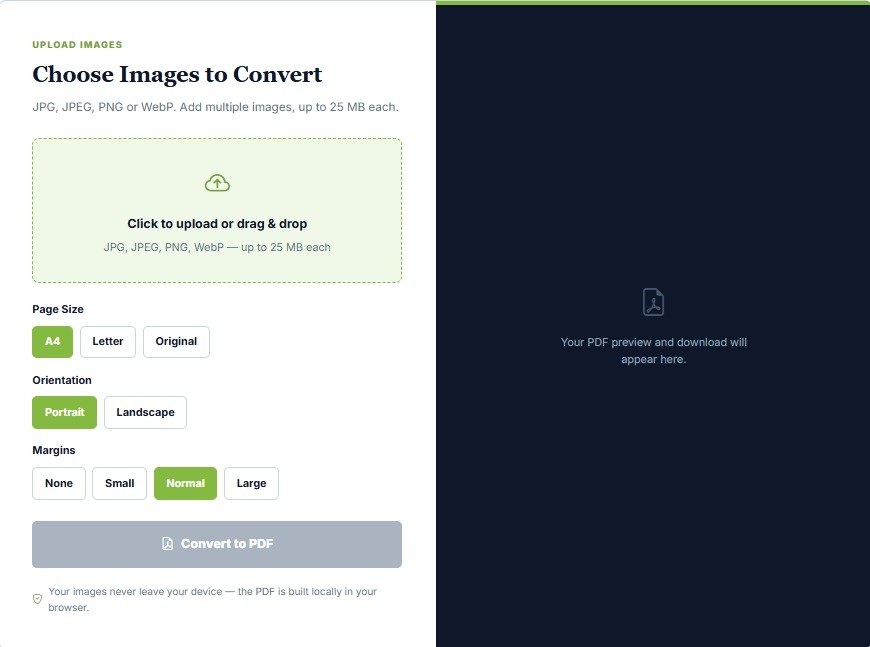
Using the JobBodh Image to PDF Converter is straightforward, highly intuitive, and requires no technical expertise. Follow these simple steps to complete your conversion in seconds:
- Access the Tool: Open the dedicated Click Here page directly in your web browser.
- Select and Upload Images: Click on the designated upload button to select the image files you want to convert from your smartphone or computer storage.
- Batch Uploading: If your application requires multiple pages—such as the front and back sides of an academic marksheet—you can select and add multiple images in one go.
- Review Selected Files: Carefully check the visual preview of your selected images before initiating the conversion process to ensure no files are missing, blurred, or duplicated.
- Arrange Page Order: If the tool provides a reordering option, organize your images into the correct chronological sequence (e.g., Certificate Page 1 followed by Page 2).
- Click Convert: Hit the Convert to PDF button to begin processing your uploaded files securely.
- Download Your File: Wait a brief moment for the PDF to generate, and then download the final converted document directly to your device storage.
Use the JobBodh Image to PDF Converter: Click Here
Image to PDF for Job Applications
ob seekers, competitive exam aspirants, and students frequently encounter rigid guidelines when applying for online recruitment drives (such as SSC, Banking, Railways, and State Police examinations), scholarship portals, or university admissions.
- Supporting Document Submissions: Candidates are regularly required to upload identity proofs (such as an Aadhaar Card, PAN Card, or Voter ID), academic marksheets (10th, 12th, and Graduation certificates), category documents, passport-size photographs, and scanned signatures.
- Meeting Portal Standards: Many recruitment and admission portals reject standard image formats or strictly limit upload file types. Converting your scanned documents into clean, well-structured PDF files ensures 100% compliance with portal guidelines.
- Pre-Check Guidelines: Always check the official notification or application instructions regarding maximum allowable PDF sizes, page limits, and resolution requirements before uploading your files. If your generated PDF file is too large for a portal's upload limit, you can use companion utility tools—such as the Click Here—to optimize your source images before conversion.