Free Image Converter: Convert JPG, PNG & WebP Online
In the modern digital environment, whether you are filling out rigorous government job application forms, uploading academic certificates to university admission portals, or optimizing media files for a personal blog or website, meeting precise image format specifications is mandatory. Different recruitment boards and digital platforms mandate specific file extensions—such as JPG, JPEG, PNG, or WebP—leaving zero room for errors. Trying to convert image formats manually or using bulky software can often be time-consuming, frustrating, and prone to quality distortion if the right utility isn't used.
The JobBodh Free Online Image Converter allows you to seamlessly convert photos, scanned documents, and graphics between popular raster formats without losing visual quality or compromising your personal data security. Operating entirely within your browser, this tool is designed to deliver lightning-fast, high-fidelity conversions for students, job seekers, and digital creators alike.
Why Are Image Formats Important for Digital Submissions?
Understanding why various online portals demand specific file extensions can help you avoid common upload rejections. Raster image formats store pixel data differently, and each format serves a unique purpose:
- JPG / JPEG (Joint Photographic Experts Group): This is the gold standard for photographs, passport-size pictures, and scanned identity proofs. It uses lossy compression to keep file sizes manageable, making it the most universally accepted format across government recruitment portals.
- PNG (Portable Network Graphics): Known for its lossless compression and support for transparent backgrounds, PNG is ideal for scanned signatures, official stamps, and sharp line art where clarity is paramount. However, PNG files tend to be larger in digital weight.
- WebP: Developed by Google, WebP provides superior compression and quality for modern web browsers, reducing website loading times significantly. However, legacy government forms often reject WebP files, requiring them to be converted back into standard JPG formats.
Key Features of Our Free Image Converter Tool
The JobBodh Image Converter is built with user convenience, data privacy, and technical accuracy in mind. Here are the core features that set it apart:
- Multiple Formats Supported: Effortlessly switch between JPG, JPEG, PNG, and WebP formats based on your precise application requirements.
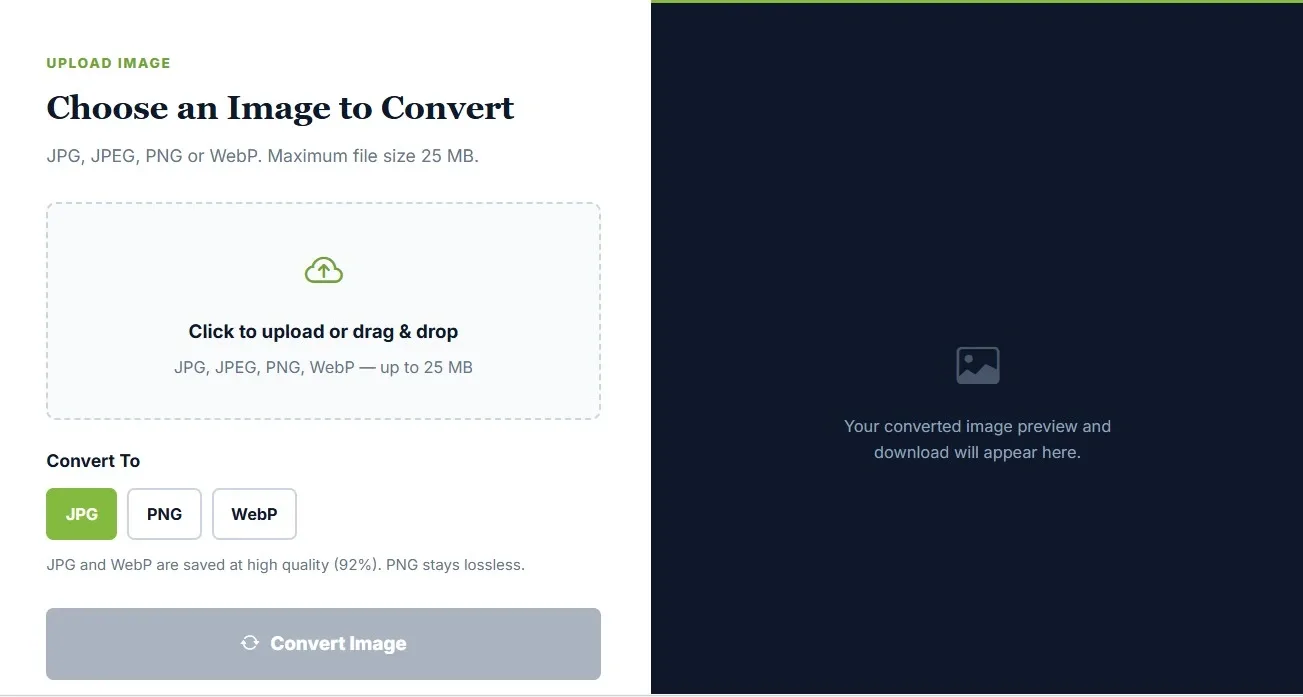
- Generous File Size Limit: The tool smoothly processes single image files up to 25 MB, accommodating high-resolution DSLR photographs and high-definition scanner outputs.
- High-Quality Output Presets: JPG and WebP conversions maintain an optimized 92% quality preset to balance clarity and file size, while PNG conversions remain 100% lossless.
- 100% Secure & Private Architecture: All image conversions happen locally right inside your web browser. Your sensitive personal documents, application photos, and identity proofs are never uploaded to external servers, guaranteeing absolute privacy.
- Instant Preview & Download: Review your converted image immediately on your screen before saving it directly to your device storage.
Step-by-Step Guide: How to Convert Your Image Online
Converting your image takes less than 10 seconds and requires no technical expertise:
- Upload Your Image: Click on the designated upload box or simply drag and drop your source JPG, JPEG, PNG, or WebP file (up to 25 MB) into the browser window.
- Select Output Format: Choose your required target format—whether you need to convert WebP to JPG for a job form or PNG to JPEG for standard viewing.
- Trigger Conversion: Click on the Convert Image button to initiate the fast processing sequence.
- Preview & Save: Your converted image preview will appear instantly on the screen. Click download to save the final file directly to your computer or mobile device.
Why Use Our Converter for Government Exam Forms?
Most central and state government recruitment boards—including the Union Public Service Commission (UPSC), Staff Selection Commission (SSC), Railway Recruitment Boards (RRB), and various State Public Service Commissions (PSCs)—strictly require candidate photographs and signature uploads in JPG or JPEG format within tightly controlled dimensions and file sizes.
If your smartphone camera captures photos in HEIC format, or if you downloaded a template image saved as a WebP file, online application portals will frequently throw an unexpected error message or block the submission altogether. Using the JobBodh Free Image Converter ensures your document formats match official recruitment guidelines effortlessly, saving you from last-minute submission stress.
Furthermore, navigating multi-stage online applications requires absolute precision when dealing with file types. Many candidates lose valuable time during the final hours of registration because legacy government servers do not recognize modern image compression extensions or non-standard device formats. By converting your files into universally accepted formats beforehand, you completely eliminate compatibility bottlenecks. Additionally, because the conversion tool processes files directly within your browser without external server uploads, your sensitive personal documents, certificates, and signatures remain entirely private and secure throughout the entire preparation and application lifecycle.
Related Career & Document Utility Tools on JobBodh
To further streamline your online application and document preparation workflow, explore these complementary free tools available on JobBodh:
| Tool | Links |
| Free Image Converter | Click Here |
| Free Image Compressor | Click Here |
| Free Image to Pdf | Click Here |
| Free Age Calculator | Click Here |
| Free Typing Test | Click Here |